Python 解释器
这个组件允许你执行带有已导入包的 Python 代码。
Python Interpreter(Python 解释器)组件只能导入当前 SkillFlaw 环境中已经安装的包。
如果你在使用某个包时遇到 ImportError,就需要先安装它。
如需安装自定义包,请参阅安装自定义依赖。
在流程中使用 Python 解释器
- 要在流程中使用该组件,请先在 Global Imports 字段中填写一个以英文逗号分隔的包列表,例如
math,pandas。 至少需要导入一个包。 - 在 Python Code 字段中输入你要执行的 Python 代码。若要查看输出,请使用
print()。 - 可选:启用 Tool Mode,然后把 Python Interpreter 组件作为工具连接到 Agent 组件。
例如,你可以把 Python Interpreter 和 Calculator 组件 一起作为 Agent 的工具,再观察它是如何针对不同数学问题自动选用不同工具的。
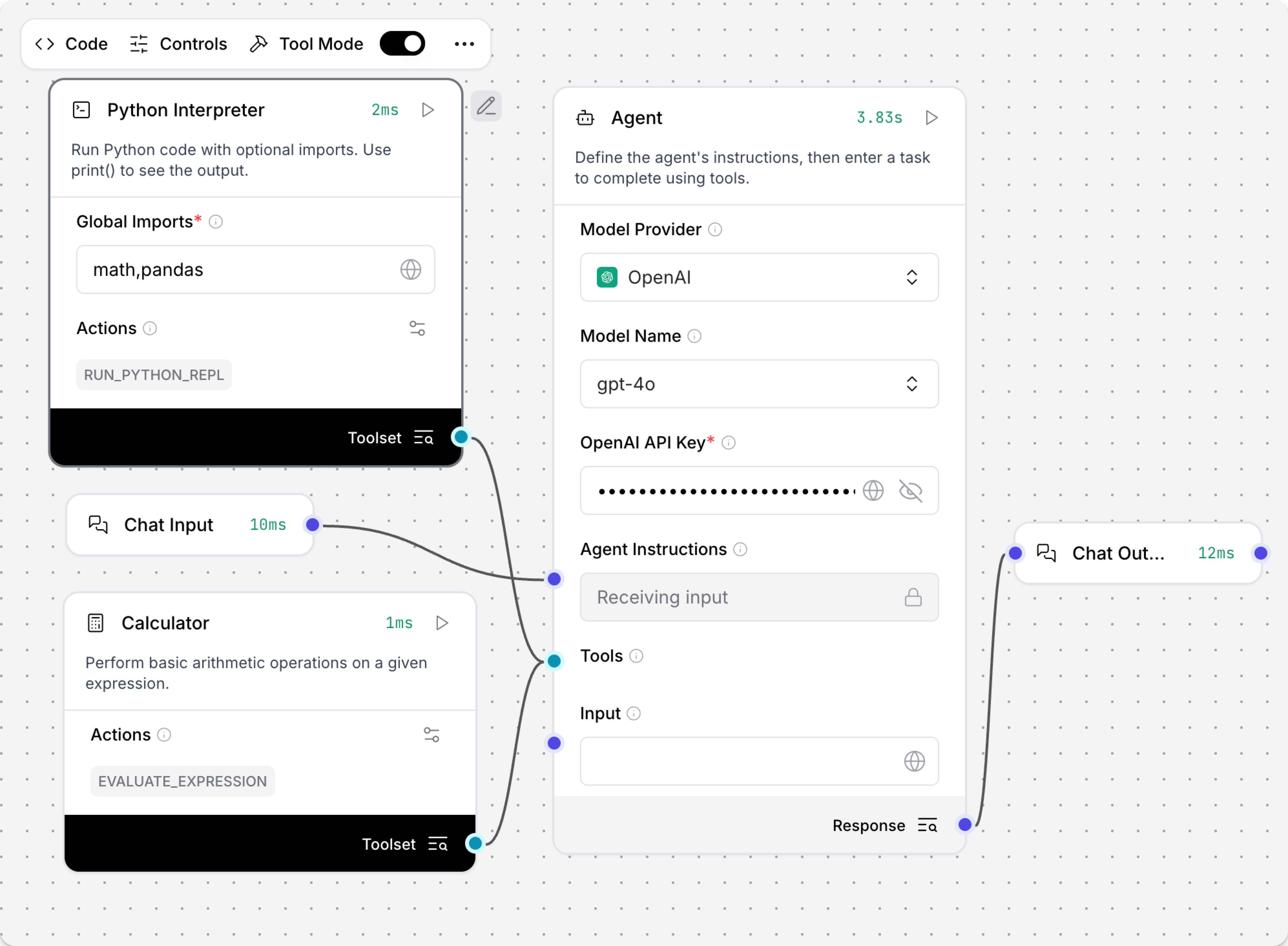
- 向 Agent 提一个简单的数学问题。
Calculator 工具可以完成加减乘除和幂运算。
这时 Agent 会调用
evaluate_expression工具来正确回答问题。
结果:
_10Executed evaluate_expression_10Input:_10{_10 "expression": "2+5"_10}_10Output:_10{_10 "result": "7"_10}
- 再给 Agent 一段完整的 Python 代码。
下面这个例子会使用全局导入的
pandas创建一个 DataFrame,并计算平方值平均数的平方根。
_12import pandas as pd_12import math_12_12# Create a simple DataFrame_12df = pd.DataFrame({_12 'numbers': [1, 2, 3, 4, 5],_12 'squares': [x**2 for x in range(1, 6)]_12})_12_12# Calculate the square root of the mean_12result = math.sqrt(df['squares'].mean())_12print(f"Square root of mean squares: {result}")
在这个场景中,Agent 会正确选择 run_python_repl 工具来完成任务。
结果:
_12Executed run_python_repl_12_12Input:_12_12{_12 "python_code": "import pandas as pd\nimport math\n\n# Create a simple DataFrame\ndf = pd.DataFrame({\n 'numbers': [1, 2, 3, 4, 5],\n 'squares': [x**2 for x in range(1, 6)]\n})\n\n# Calculate the square root of the mean\nresult = math.sqrt(df['squares'].mean())\nprint(f\"Square root of mean squares: {result}\")"_12}_12Output:_12_12{_12 "result": "Square root of mean squares: 3.3166247903554"_12}
即使你在聊天输入中没有再次写出 import 语句,Agent 也仍然可以使用 pd.DataFrame 来构建表格,因为 pandas 已经通过 Python Interpreter 的 Global Imports 字段预先在全局范围内导入了。
给 Python 解释器传递输入
如果你想给 Python Interpreter 组件传入额外输入,需要修改组件代码,为它添加输入字段。 当新的输入字段加到组件代码中后,对应端口才会出现在编辑器里,允许其他组件连接。
例如,如果你想连接一个 Text 组件,并把一个 URL 值传给 Python Interpreter,可以按下面步骤操作:
-
向流程中添加一个 Python Interpreter 组件。
-
点击 Edit Code,修改 Python Interpreter 的代码。
-
为了支持 URL 输入,需要做以下改动:
a. 在
inputs列表中增加 URL 输入字段。这样就会在组件上生成新的输入端口,供其他组件连接。b. 修改
get_globals方法,提取 URL 值并放入 globals 字典。 这样组件中的 Python 代码就能直接访问url变量。c. 更新默认 Python 代码,使其实际使用这个
url变量。下面示例展示了这些修改:
Python 代码示例
_121import importlib_121_121from langchain_experimental.utilities import PythonREPL_121from lfx.custom.custom_component.component import Component_121from lfx.io import MultilineInput, Output, StrInput_121from lfx.schema.data import Data_121from lfx.schema.message import Message # Needed to extract text from Message objects_121_121class PythonREPLComponent(Component):_121display_name = "Python Interpreter"_121description = "Run Python code with optional imports. Use print() to see the output."_121documentation: str = "https://docs.skillflaw.com/python-interpreter"_121icon = "square-terminal"_121_121inputs = [_121StrInput(_121name="global_imports",_121display_name="Global Imports",_121info="A comma-separated list of modules to import globally, e.g. 'math,numpy,pandas'.",_121value="math,pandas",_121required=True,_121),_121MultilineInput(_121name="python_code",_121display_name="Python Code",_121info="The Python code to execute. Only modules specified in Global Imports can be used. Use 'url' variable if URL input is connected.",_121value="print(f'URL: {url}')", # Updated to make the URL variable available to the Python code execution_121input_types=["Message"],_121tool_mode=True,_121required=True,_121),_121# Add the URL input field to inputs list_121StrInput(_121name="url",_121display_name="URL",_121info="URL variable that can be used in Python code. Connect a Text component or enter manually.",_121value="",_121input_types=["Text", "Message"],_121required=False,_121),_121]_121_121outputs = [_121Output(_121display_name="Results",_121name="results",_121type_=Data,_121method="run_python_repl",_121),_121]_121_121def get_globals(self, global_imports: str | list[str]) -> dict:_121"""Create a globals dictionary with only the specified allowed imports and input variables."""_121global_dict = {}_121_121try:_121if isinstance(global_imports, str):_121modules = [module.strip() for module in global_imports.split(",")]_121elif isinstance(global_imports, list):_121modules = global_imports_121else:_121msg = "global_imports must be either a string or a list"_121raise TypeError(msg)_121_121for module in modules:_121try:_121imported_module = importlib.import_module(module)_121global_dict[imported_module.__name__] = imported_module_121except ImportError as e:_121msg = f"Could not import module {module}: {e!s}"_121raise ImportError(msg) from e_121_121# Add the URL variable to the component's globals dictionary_121# Extract from Message object or use the string directly_121if hasattr(self, "url") and self.url:_121url_value = self.url.text if isinstance(self.url, Message) else str(self.url)_121if url_value:_121global_dict["url"] = url_value # Makes 'url' available in Python code_121self.log(f"URL variable set: {url_value}")_121_121except Exception as e:_121self.log(f"Error in global imports: {e!s}")_121raise_121else:_121self.log(f"Successfully imported modules: {list(global_dict.keys())}")_121return global_dict_121_121def run_python_repl(self) -> Data:_121try:_121# Extract Python code text if it's a Message object_121python_code_text = self.python_code_121if isinstance(python_code_text, Message):_121python_code_text = python_code_text.text if python_code_text.text else ""_121elif not isinstance(python_code_text, str):_121python_code_text = str(python_code_text)_121_121globals_ = self.get_globals(self.global_imports)_121python_repl = PythonREPL(_globals=globals_)_121result = python_repl.run(python_code_text)_121result = result.strip() if result else ""_121_121self.log("Code execution completed successfully")_121return Data(data={"result": result})_121_121except ImportError as e:_121error_message = f"Import Error: {e!s}"_121self.log(error_message)_121return Data(data={"error": error_message})_121_121except SyntaxError as e:_121error_message = f"Syntax Error: {e!s}"_121self.log(error_message)_121return Data(data={"error": error_message})_121_121except (NameError, TypeError, ValueError) as e:_121error_message = f"Error during execution: {e!s}"_121self.log(error_message)_121return Data(data={"error": error_message})_121_121def build(self):_121return self.run_python_repl -
点击 Check & Save 保存修改。
-
向流程中添加一个 Text 组件,并填写一个值,例如
google.com。 -
将 Text 组件的输出连接到你刚刚为 Python Interpreter 新增的 URL 输入字段。
这样,Python Interpreter 在执行 Python 代码时,就可以直接使用 url 变量了。
Python 解释器参数
| Name | Type | Description |
|---|---|---|
| global_imports | String | 输入参数。全局导入模块的逗号分隔列表,例如 math,pandas,numpy。 |
| python_code | Code | 输入参数。要执行的 Python 代码;只能使用 Global Imports 中声明过的模块。 |
| results | Data | 输出参数。执行结果,以 Data 形式返回,包括打印输出或错误信息。 |