Composio
Bundles 按提供方对组件进行分组,这些组件可将第三方服务与 SkillFlaw 集成。
本页介绍 Composio bundle 中可用的组件。
有关特定 Composio 功能的信息,请参见 Composio documentation。
在 flow 中使用 Composio 组件
Composio 组件主要用作代理工具。
Composio bundle 包含一个聚合型的 Composio Tools 组件,以及以下单服务组件:
Composio 单服务组件
- AgentQL
- Agiled
- Airtable
- Apollo
- Asana
- Attio
- Bitbucket
- Bolna
- Brightdata
- Calendly
- Canva
- Canvas
- Coda
- Contentful
- Digicert
- Discord
- Dropbox
- ElevenLabs
- Exa
- Figma
- Finage
- Firecrawl
- Fireflies
- Fixer
- Flexisign
- Freshdesk
- GitHub
- Gmail
- Google BigQuery
- Google Calendar
- Google Classroom
- Google Docs
- Google Meet
- Google Sheets
- Google Tasks
- Heygen
- Jira
- Jotform
- Klaviyo
- Linear
- Listennotes
- Mem0
- Miro
- Missive
- Notion
- OneDrive
- Outlook
- Pandadoc
- PeopleDataLabs
- PerplexityAI
- SerpAPI
- Slack
- Slackbot
- Snowflake
- Supabase
- Tavily
- TimelinesAI
- Todoist
- Wrike
- YouTube
Composio Tools 组件是多个 Composio 服务(工具)的统一入口。 不过,这些服务中的大多数也都提供单服务组件,通常推荐优先使用单服务组件,而不是 Composio Tools 组件。
虽然你也可以在 flow 中将单服务组件用于非代理型操作,但它们主要是与 Agent 组件配合在 Tool Mode 下使用。 相比之下,Composio Tools 组件 只能 作为代理工具使用;它不支持非代理型用法。
以下示例演示如何将 Composio Gmail 组件作为 Agent 组件的工具使用。 这样一来,代理在生成响应时如果有需要,就可以调用 Composio Gmail 功能。 你也可以用同样的方式连接其他 Composio 组件。
-
基于 Simple Agent 模板创建一个 flow。
-
在 Bundles 中找到 Composio bundle,然后将 Gmail 组件添加到 flow。
-
在 Composio API Key 字段中,输入你的 Composio API key,或者使用
COMPOSIO_API_KEY全局变量。 有关更多信息,请参见 Composio authentication。如果 key 有效, Alert 会被 Success 指示器替代,并且 Actions 列表会填充该 API key 可用的操作。
-
在组件标题菜单中启用 Tool Mode。
如果你使用的是 Composio Tools 组件,则跳过此步骤,因为该组件已经配置为工具。
-
在 Actions 列表中,配置你希望提供给代理使用的 Gmail 操作。 你可以选择允许使用的操作,也可以编辑每个操作的 slug(代理标签)和描述,以帮助代理决定应使用哪些工具。
-
将 Gmail 组件的 Toolset 输出连接到 Agent 组件的 Tools 输入。
-
在 Agent 组件中,输入你的 OpenAI API key,或将 Agent 组件配置为使用其他 LLM。 有关更多信息,请参见语言模型组件。
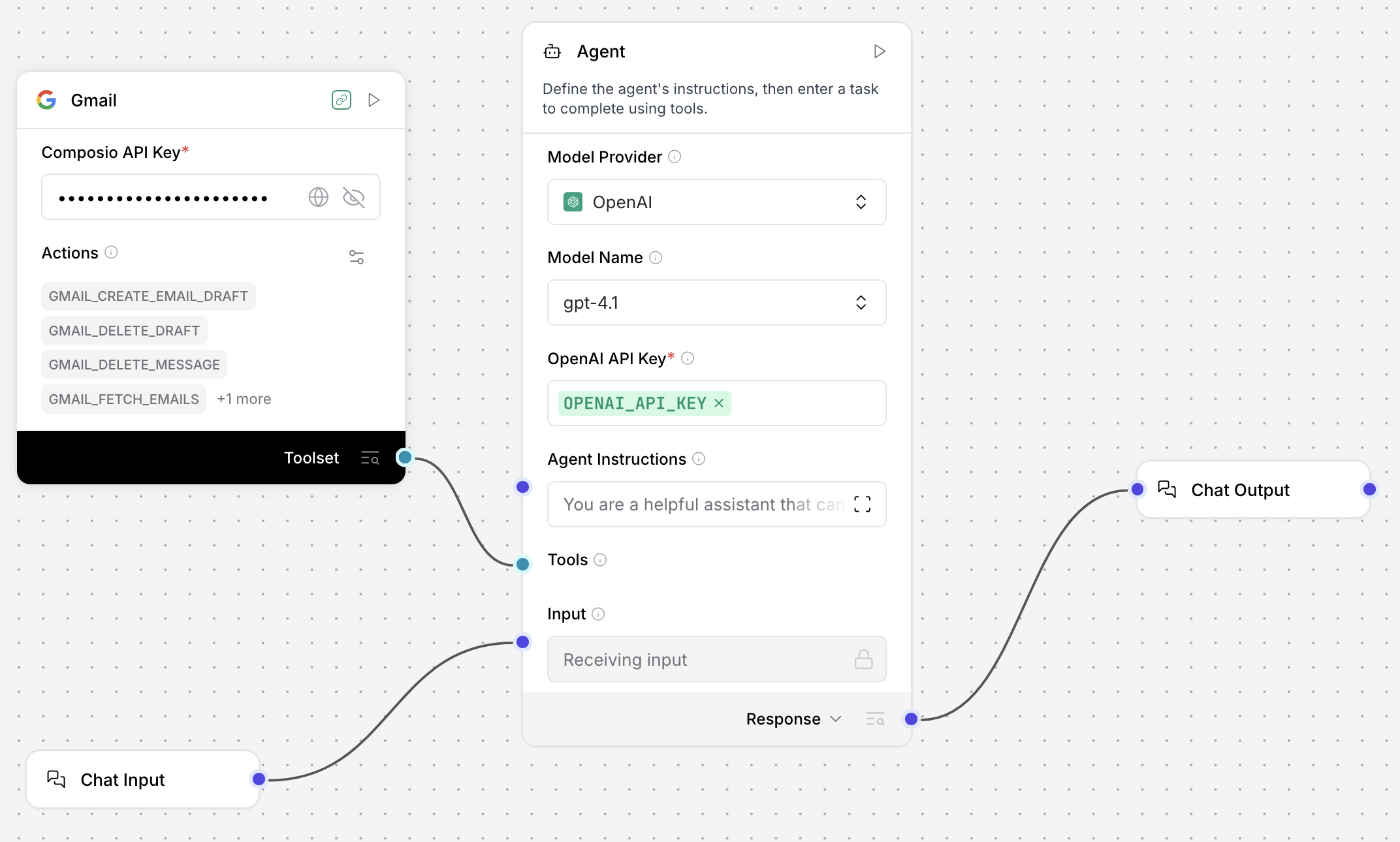
到这一步,你的 flow 中会有四个已连接的组件:
- Chat Input 组件连接到 Agent 组件的 Input 端口。 这样 flow 就可以由用户或应用程序传入的 prompt 触发。
- Gmail 组件作为工具连接到 Agent 组件。 代理不会在每个请求中都使用这个工具;只有在它判断 Gmail 工具能帮助响应 prompt 时,才会使用这条连接。
- Agent 组件的 Output 端口连接到 Chat Output 组件,后者将最终响应返回给用户或应用程序。
-
要测试该 flow,点击 Playground,然后询问 LLM 它可用的工具。 代理应返回一份已连接工具的列表,其中包括 Gmail 工具以及 Agent 组件中的内置工具。 例如:
_18User:_18What tools are available to you?_18_18I have access to a variety of tools that allow me to help you with different tasks. Here are the main categories of tools available to me:_18_181. Gmail Tools:_18- Fetch emails, search, and filter messages._18- Fetch specific email details by message ID._18- Create email drafts (with attachments, HTML, CC/BCC, etc.)._18- Delete email drafts or specific messages._18_182. Date & Time Tools:_18- Get the current date and time in any timezone._18_183. Multi-Tool Use:_18- Run multiple tools in parallel for efficiency._18_18If you have a specific task in mind, let me know and I can tell you which tool I would use or demonstrate how I can help! -
要测试某个特定工具或功能,可以要求代理执行一个会用到该工具的操作。 例如,让代理编写一封邮件草稿:
_10Create a draft email with the subject line "Greetings from Composio"_10recipient: "your.email@address.com"_10Body content: "Hello from composio!"Playground 会输出代理的决策过程,显示它选择了
GMAIL_CREATE_EMAIL_DRAFT工具来创建邮件草稿。 以下示例响应做了节选:_10The draft email with the subject "Greetings from Composio" and body "Hello from composio!" has been successfully created._24{_24"recipient_email": "your.email@address.com",_24"subject": "Greetings from Composio",_24"body": "Hello from composio!",_24"is_html": false_24}_24_24{_24"data": {_24"response_data": {_24"id": "r-237981011463568567",_24"message": {_24"id": "195dd80528171132",_24"threadId": "195dd80528171132",_24"labelIds": [_24"DRAFT"_24]_24}_24}_24},_24"error": null,_24"successfull": true,_24"successful": true_24}如需进一步确认,你可以前往自己的 Gmail 账户,在草稿箱中找到这封邮件。
-
可选:如需添加更多 Composio 服务,可重复这些步骤,将更多 Composio 组件加入 flow。 对于每个组件,都需要提供必要的凭据、启用 Tool Mode、配置操作,然后将其连接到 Agent 组件的 Tools 端口。
Composio 参数
所有单服务 Composio 组件都具有相同的参数,而 Composio Tools 组件额外多一个参数:
| Name | Type | Description |
|---|---|---|
| entity_id | String | 输入参数。Composio 账户的实体 ID。默认值:default。该参数在可视化编辑器中默认隐藏。如果你需要设置此参数,可通过组件标题菜单中的 Controls 访问。 |
| api_key | SecretString | 输入参数。用于通过 Composio 平台进行身份验证的 Composio API key。请确保该 key 已获得你要使用的具体服务的授权。有关更多信息,请参见 Composio authentication。 |
| tool_name | Connection | 仅适用于 Composio Tools 组件的输入参数。选择要连接的 Composio 服务(工具)。 |
| action | List | 输入参数。选择要使用的操作。可用操作因服务而异。某些操作可能需要对特定服务具备高级访问权限。 |
Composio 身份验证
Composio 组件需要使用 Composio API key 通过 Composio 平台进行身份验证。
你可以直接在组件中提供该 key,也可以使用 COMPOSIO_API_KEY 全局变量,SkillFlaw 可自动从你的 .env 文件中加载它。
Composio API key 仅 用于处理与 Composio 的连接。 各服务提供方的身份验证需要在 Composio 平台中分别为你想使用的每项服务进行管理。
请确保你的 Composio API key 可以访问 flow 中组件所需的服务。 例如,如果你使用的是 Composio Gmail 组件,那么你的 Composio API key 必须具有 Gmail 服务的访问权限。
Composio 输出
当作为代理工具使用时,Composio 组件输出的是 Tools,即供代理使用的一组工具。
当代理调用它们时,来自 Composio 服务的响应会被代理吸收处理,而不会作为输出直接传递给用户或应用程序。
在非代理型使用场景下,输出为 DataFrame,其中包含指定 Composio 服务根据 flow 中所用组件与操作返回的响应。
由于 Composio Tools 组件 仅 支持代理型使用,因此它不能输出 DataFrame。
所有单服务 Composio 组件都可以输出 DataFrame 或 Tools。