Digital employees and AGENT integration
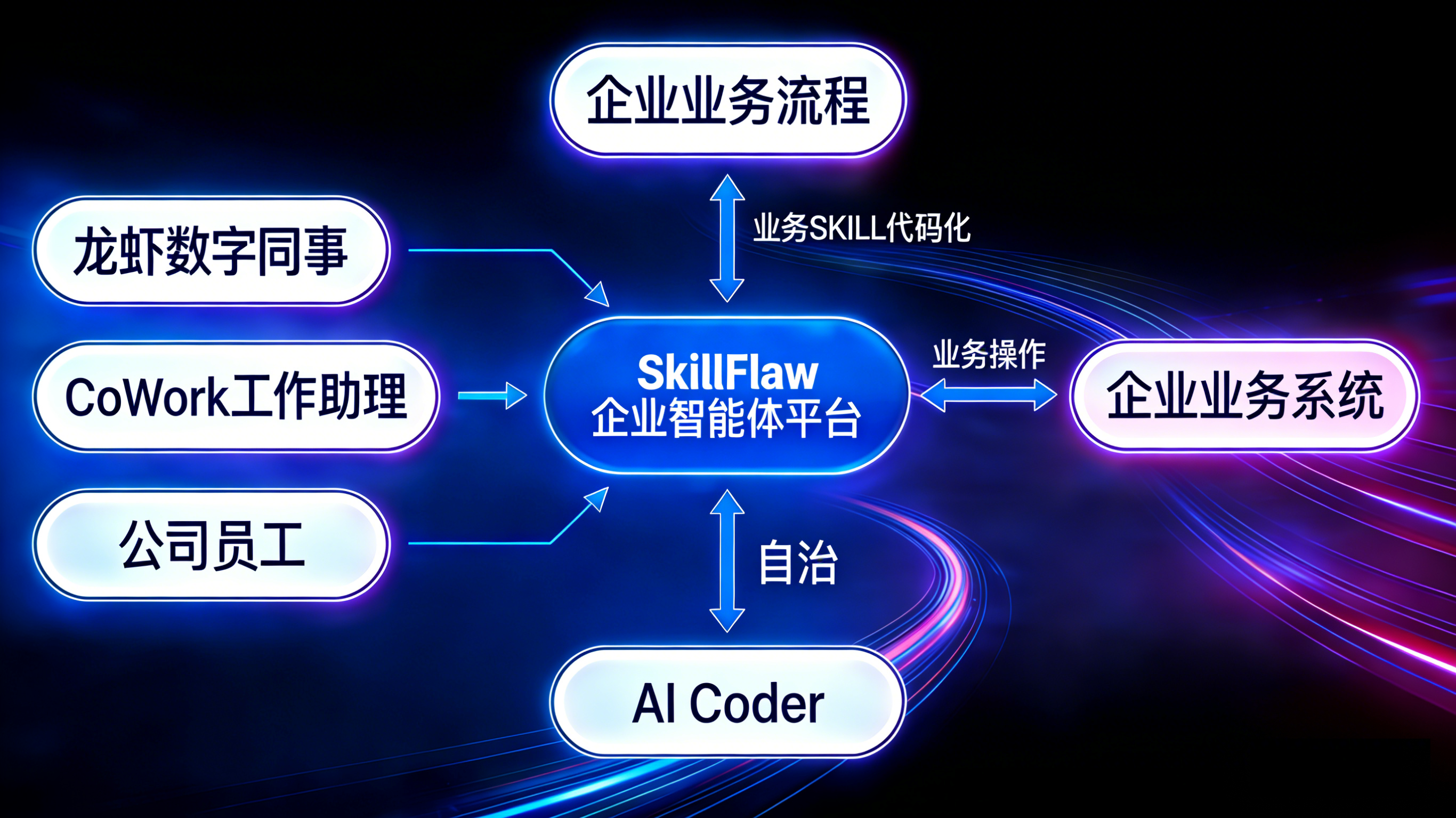
SkillFlaw's current product direction is not limited to workflow editing. It is moving toward a governed platform where reusable business capabilities can be packaged as skills and then consumed by digital employees and external AGENT systems.
In this model:
- the management layer defines tenancy, authorization, and operating rules
- the resource layer provides reusable models, components, knowledge bases, MCP services, plugins, and variables
- the business layer assembles executable projects and workflows
- the skill layer packages those business capabilities into governed skills that can be discovered, read, delivered, and executed
Why skillflaw-cli matters
skillflaw-cli is the repository-backed command-line entry point for working with governed skill and workflow capabilities from outside the visual product UI.
It is designed for four core outcomes:
- discover the correct node in the My Skills tree
- fetch the skill content for a business capability
- save markdown deliverables and attachment bundles when needed
- run an online workflow with an explicit JSON payload
This makes it the practical bridge between SkillFlaw's governed skill layer and runtime consumers such as:
- enterprise digital employees
- external AGENT frameworks
- orchestration services
- integration workers and automation pipelines
What the CLI supports today
The current CLI implementation exposes these command groups:
| Command group | What it does | Typical use |
|---|---|---|
config | Initializes, updates, and shows CLI configuration | Set base URL, API key, and language |
skilltree | Traverses the My Skills hierarchy | Find the exact tenant, business, project, skill, or workflow node |
fetch_skill | Displays skill markdown or saves local deliverables | Bring skill markdown into an AGENT workflow or export an attachment bundle |
run_flow | Runs an online workflow bound inside a project | Trigger a business process from a digital employee or AGENT |
cache | Placeholder command skeleton only | Not a real cache invalidation mechanism at this stage |
Configuration
The CLI keeps its local configuration in ~/.skillflaw/my-skills-cli.json.
From the current implementation, the effective defaults and behavior are:
- default base URL:
http://127.0.0.1:7860 - request language follows
skillLang - API-key mode sends the key by
x-api-key
Use these commands to inspect or update CLI state:
_10skillflaw-cli config show_10skillflaw-cli config init --base-url <baseUrl> --api-key <apiKey> --skill-lang zh --lang zh-CN_10skillflaw-cli config set --api-key <apiKey>_10skillflaw-cli config set --base-url <baseUrl>
The standard integration flow
1. Discover the correct business node
Skills and workflows are attached to real project objects in the My Skills tree. If you do not already have a trusted identifier, start from the tree:
_10skillflaw-cli skilltree root_10skillflaw-cli skilltree children --node <node>
Use this step to locate the exact tenant, business domain, project, workflow, or skill node that your integration should use.
2. Retrieve the skill contract
When a digital employee or AGENT needs the governed business instructions, fetch the skill markdown directly, or save it locally when a file is needed:
_10skillflaw-cli fetch_skill --node <node>_10skillflaw-cli fetch_skill --node <node> --output ./artifacts/business-skill.md
This is the most direct way to bring a governed business skill into another runtime. The markdown can be used as:
- the operating instruction for an AGENT
- a reviewed business prompt or policy artifact
- an auditable handoff between platform teams and automation teams
3. Save deliverables when files are required
If the downstream system needs a file artifact instead of inline markdown, save through fetch_skill:
_10skillflaw-cli fetch_skill --node <node> --output ./artifacts/business-skill.md
For attachment-type project skills, the CLI saves the markdown file and a sibling .zip bundle that shares the same basename.
4. Run the governed workflow
Once the business node is known and the input payload is ready, trigger the workflow:
_10skillflaw-cli run_flow --project-id <projectId> --flow-id <flowId> --payload '{"ticket_id":"T-1001"}'_10skillflaw-cli run_flow --project-id <projectId> --flow-id <flowId> --file ./payload.json
This pattern allows a digital employee or AGENT to call a governed business process without bypassing SkillFlaw's packaging and delivery model.
How digital employees and AGENTs connect through skills
A practical repository-aligned pattern is:
Pattern A: read the skill as the governed operating contract
Use fetch_skill when the external AGENT needs the latest governed business instructions before it reasons or plans.
Typical fit:
- HR digital employees
- reimbursement assistants
- procurement or approval AGENTs
- customer-service orchestration workers
Pattern B: save or download the skill into the consumer runtime
Use fetch_skill --output ... when the external system needs a local artifact for:
- packaging
- review
- offline processing
- source-controlled delivery into another automation environment
Pattern C: execute the workflow after discovery
Use run_flow when the external system should not stop at reading instructions, but should trigger the governed business process directly.
Typical fit:
- approval submission
- contract review flow invocation
- reimbursement validation
- project-specific business automation
Recommended operating sequence
Unless all identifiers and configuration values are already trusted, use this order:
- inspect current CLI state with
config show - set or update the API key with
config init/config setwhen the target capability requires API-key access - discover the target with
skilltree rootandskilltree children - retrieve the skill with
fetch_skill - save files only when a file artifact is required
- execute the workflow with
run_flowonly after the target node or flow is confirmed
Rules carried by the distributed skill template
The CLI is distributed with an accompanying skill template that defines strict operating rules for enterprise business tasks. The important rules are:
- do not guess
nodeId,projectId,skillId, orflowId - do not bypass the CLI with handcrafted HTTP calls
- discover first, then read, save, download, or run
- stop when critical inputs such as
apiKey,baseUrl, identifiers, or JSON payload are missing - treat
cache clearas a placeholder rather than a real cache invalidation control
View the key template excerpt
When the task is a real enterprise business task and requires an existing SkillFlaw skill or workflow, the integration must use
skillflaw-clifor discovery and execution.The integration must first locate the target through the tree, then continue with
fetch_skillorrun_flow.It must not guess identifiers, assemble direct backend requests, or silently skip missing prerequisites.
Example: integrating a digital employee with a business skill
A simple end-to-end pattern looks like this:
_10skillflaw-cli config show_10skillflaw-cli config set --api-key <apiKey>_10skillflaw-cli skilltree root_10skillflaw-cli skilltree children --node <tenantNodeId>_10skillflaw-cli skilltree children --node <businessNodeId>_10skillflaw-cli skilltree children --node <projectNodeId>_10skillflaw-cli fetch_skill --node <skillNodeId>_10skillflaw-cli run_flow --project-id <projectId> --flow-id <flowId> --payload '{"employee_id":"E1001","action":"submit"}'
In this sequence, the digital employee:
- authenticates against SkillFlaw
- discovers the governed business context
- reads the business skill as the operating contract
- triggers the governed workflow with explicit input