Product manual overview
This section organizes user-facing documentation around product usage so readers can quickly locate the corresponding pages, modules, and operations in the live product.
Main interface example
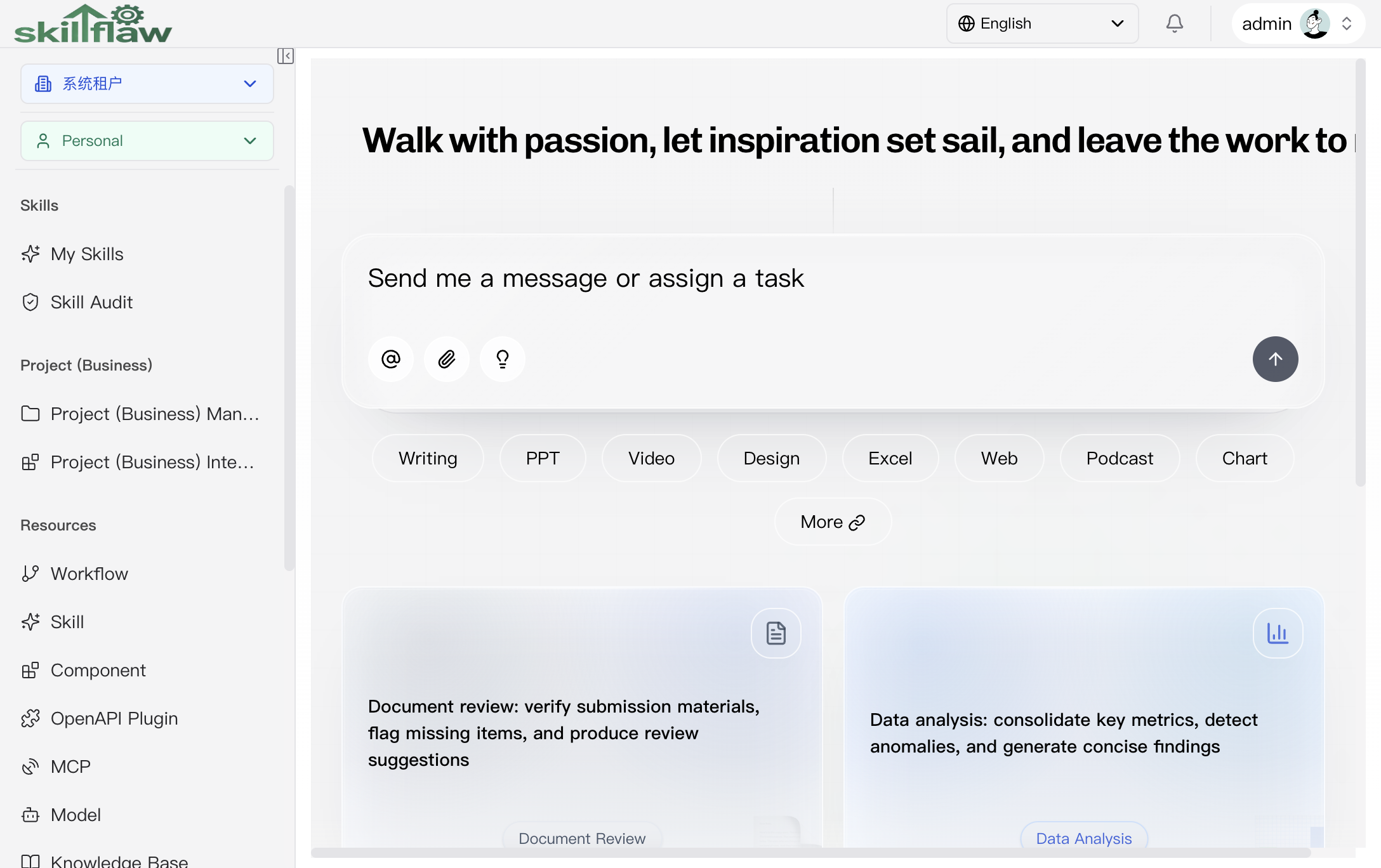
The screenshot above shows the main interface of SkillFlow. The page provides the global tenant selector, business-context selector, left navigation, and the working area used to open the selected module.
The product manual is built around this live interface and focuses on the following user-facing information:
- page entry points
- tabs and screen areas
- create / edit / delete / publish / bind / test operations
- permission-dependent behavior
- scope-dependent behavior across system, tenant, business-domain, and personal contexts
Manual groups and modules
The product manual is aligned with the four main menu groups displayed in the product.
Skills
- Skills area overview
- My skills manual: browse skill trees, project entries, and skill resources.
- Skill audit manual: review the audit entry page and visible status.
Business
- Business area overview
- Project management manual: maintain project cards, versions, and project resources.
- Project integration manual: review the project-integration entry page and visible status.
Resources
- Resources area overview
- Workflow manual: design, maintain, and publish workflows.
- Workflow template manual: review reusable templates through the template plaza and template detail page.
- Skill manual: manage skill resources and their related actions.
- Component manual: maintain component groups, search results, and component resources.
- OpenAPI plugin manual: manage OpenAPI plugin resources and plaza views.
- MCP manual: maintain MCP resources, versions, and related operations.
- Model manual: preview model providers and available models.
- Knowledge base manual: manage knowledge-base resources and related operations.
- Variables manual: maintain variables and their values.
Management
- Management area overview
- Tenant manual: manage tenant users, tenant roles, and tenant business domains.
- Business domain manual: maintain business-domain trees, authorization, and resource scope.
- Model management manual: maintain system-tenant model configurations.
- Organization and user groups manual: maintain organizations, user groups, and member relationships.
- User management manual: maintain user profiles and account access settings.
- Permission manual: review modules, role definitions, and permission semantics.
- Dictionary manual: maintain dictionary indexes and dictionary items.
- Config manual: maintain configuration items and stored values.
How to use this section
Start from the menu group that matches your task, then continue to the corresponding module page to review the real entry, page layout, tabs, dialogs, key fields, and operation results.