Permission model
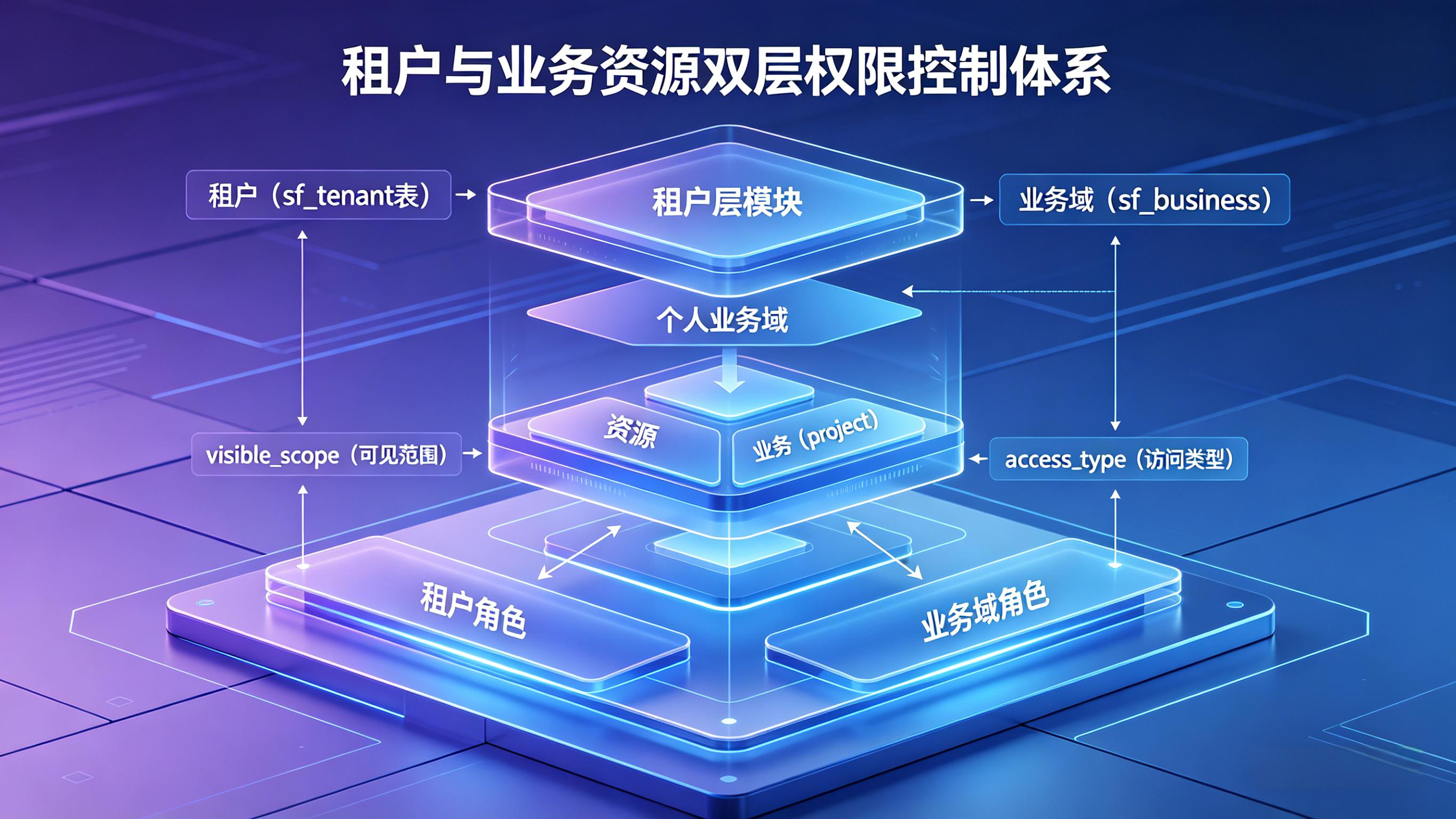
SkillFlaw uses a multi-layer permission model built around tenants, business domains, resource scope, visibility, and action boundaries. The authoritative semantics are defined by the platform's unified permission rules and authorization logic.
Security architecture
SkillFlaw's security architecture is organized around a control loop of authentication first, authorization second, and resource access or isolated execution last. Browsers, frontend clients, webhooks, system integrations, and MCP clients all enter the platform through the API gateway. The authentication service handles password validation, token issuance, refresh, and session checks, while the authorization service makes resource-level decisions based on tenant roles, business-domain roles, resource ownership, visibility, and operation type.
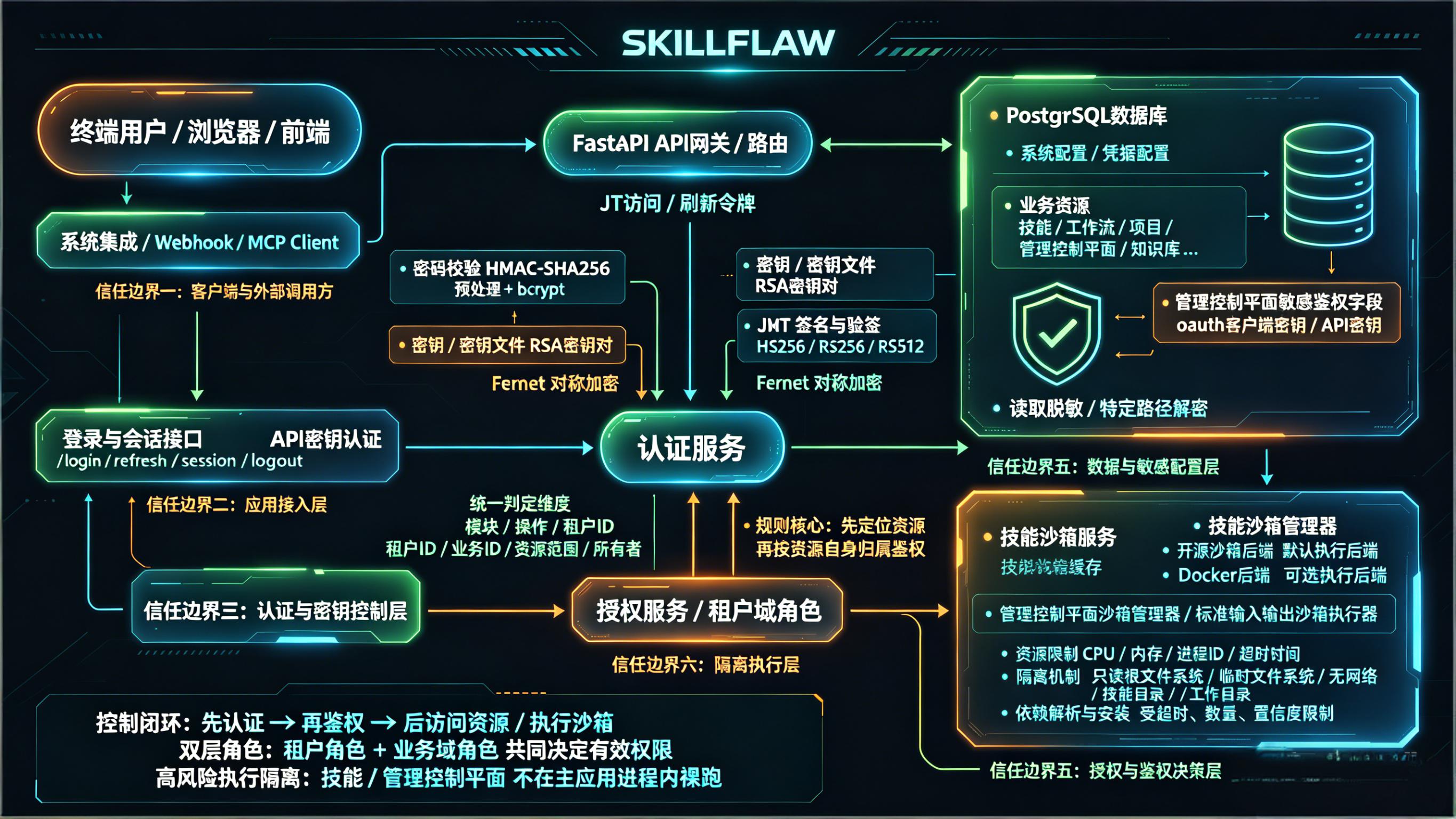
The security architecture can be understood through the following layers:
- Entry and access boundary: end users, browser clients, webhooks, and MCP clients reach the platform only through controlled interfaces, preventing direct access to internal resources or execution environments.
- Authentication and key control: login, token refresh, session validation, and logout are routed through the authentication service, where password checks, keys or key files, JWT signing, and Fernet symmetric encryption are handled centrally.
- Authorization and resource evaluation: the authorization service does not rely only on page context. It evaluates module, operation, tenant ID, business ID, resource scope, and ownership, with the core rule being to locate the resource first and then authorize against the resource's own attributes.
- Data and sensitive configuration protection: system configuration, credential configuration, business resources, and sensitive control-plane fields stored in PostgreSQL are all treated as protected data and are read, masked, or decrypted only on approved access paths.
- High-risk execution isolation: the skill sandbox service and sandbox manager form an isolated execution layer. CPU, memory, process IDs, timeouts, filesystem access, and network capabilities are constrained so that high-risk code does not run directly inside the main application process.
This architecture is the reason the permission model cannot depend on page-level context alone. Users must first establish identity through authentication, then pass resource-level authorization based on the resource's own ownership and scope before they can read data, access sensitive configuration, or enter isolated execution paths.
Multi-tenant model
The platform separates data and permissions by tenant. A tenant is the primary administrative boundary. Tenant membership and tenant roles can be assigned through:
- direct user authorization
- user groups
- organizations
Within the permission model, tenant roles determine what a user can see or manage at the tenant level.
System tenant
The system tenant is a special tenant with:
is_sys = truetenant_id = 00000000-0000-0000-0000-000000000000
System-level resources are represented as resources that belong to the system tenant rather than by introducing a separate long-term business scope. System-tenant write operations are evaluated against the system tenant itself.
Business domain and personal context
SkillFlaw distinguishes between business-domain data and personal data.
Business domain
Business domains are hierarchical and can extend to multiple levels. Projects and workflows are created under business domains, and business-domain authorization is inherited downward.
Personal business domain
A personal business domain is a special case represented by:
business_id = 0- the owner is identified by
c_uid
This model allows the system to distinguish personal artifacts from shared business-domain artifacts.
Role model
The permission model uses two major role families.
Tenant roles
Tenant roles include:
TENANT_ADMINTENANT_READONLYTENANT_EMPLOYEETENANT_ORGTENANT_BIZTENANT_DEVTENANT_OPSTENANT_QA
These roles govern tenant-level visibility, administration, and in some cases personal resource operations.
- Tenant Admin (
TENANT_ADMIN): the highest administrative role within a tenant. It owns the full tenant governance ceiling and, in the system-tenant context, also governs creating, modifying, and deleting tenants. - Tenant Readonly (
TENANT_READONLY): the baseline tenant-side read role. It can view tenant information other than user governance data, but it cannot create, modify, or delete resources or authorization settings. - Tenant Employee (
TENANT_EMPLOYEE): extendsTENANT_READONLYwith write access for the user's own personal-scope resources. It does not automatically grant organization governance, first-level business creation, or higher-level authorization governance. - Tenant Organization Admin (
TENANT_ORG): inheritsTENANT_EMPLOYEEcapabilities and adds tenant organization governance. It can maintain tenant user, user-group, and organization-role authorization relations; tenant user / group / organization authorization and removal are governed by this role together withTENANT_ADMIN. - Tenant Business Admin (
TENANT_BIZ): inheritsTENANT_EMPLOYEEcapabilities and governs first-level business domains. It can create first-level business domains and maintain their business-admin authorization; first-level business create / modify / delete governance is shared withTENANT_ADMIN. - Tenant Developer (
TENANT_DEV): a job-oriented role with the same effective permissions asTENANT_OPSandTENANT_QA. It owns most tenant permissions except organization maintenance and first-level business creation, and is intended for component, workflow, and skill development collaboration. - Tenant Operations (
TENANT_OPS): a job-oriented role with the same effective permissions asTENANT_DEVandTENANT_QA. It fits runtime assurance, configuration maintenance, and status-check scenarios, while still following unified ownership, scope, andPRIVATErules. - Tenant QA (
TENANT_QA): a job-oriented role with the same effective permissions asTENANT_DEVandTENANT_OPS. It is intended for testing, validation, connectivity checks, and result confirmation; test-like interfaces follow unifiedREADsemantics.
Business-domain roles
Business-domain roles include:
BUSINESS_ADMINBUSINESS_READONLYBUSINESS_EMPLOYEEBUSINESS_DEVBUSINESS_QABUSINESS_OPS
These roles govern what users can do inside a business domain and its descendants.
- Business Admin (
BUSINESS_ADMIN): the highest administrative role within a business domain. It can create, modify, delete, and read resources in the current business domain and all of its subdomains. - Business Readonly (
BUSINESS_READONLY): the baseline business-side visibility role. It can only view resources in the current business domain and its subdomains, and cannot create resources or modify or delete personnel-related resources there. - Business Employee (
BUSINESS_EMPLOYEE): a standard collaboration role whose effective permissions are the same asBUSINESS_READONLY. The role name distinguishes business identity, but it does not widen business-domain write permissions. - Business Developer (
BUSINESS_DEV): a job-oriented role with the same effective permissions asBUSINESS_QAandBUSINESS_OPS. It owns most business-domain permissions except business-user authorization and is intended for implementation, integration, and capability-building scenarios. - Business QA (
BUSINESS_QA): a job-oriented role with the same effective permissions asBUSINESS_DEVandBUSINESS_OPS. It fits testing, validation, checking, and result-confirmation scenarios, and test-like interfaces follow unifiedREADsemantics. - Business Operations (
BUSINESS_OPS): a job-oriented role with the same effective permissions asBUSINESS_DEVandBUSINESS_QA. It fits runtime assurance and configuration-maintenance scenarios, while effective write boundaries still follow ownership, scope, andPRIVATEsemantics.
Resource scope
For resource-type objects such as components, models, MCP services, OpenAPI plugins, knowledge bases, variables, and skills, the formal visibility scope is:
- tenant:
visible_scope = 1 - business domain:
visible_scope = 2 - personal:
visible_scope = 3
For some non-resource business objects, such as workflows and projects, the effective scope remains business-domain or personal.
Access type
access_type controls who can see an object, but it does not automatically grant write permissions.
The formal access types are:
PUBLIC: cross-tenant readablePROTECTED: tenant-internal readablePRIVATE: visibility is constrained by scope and authorization, and write access remains creator-only
A resource can therefore be visible to more users than those who are allowed to modify it.
Project audience model
Projects do not use access_type as the primary access boundary.
Instead, they use audience_type, with the following modes:
ALLUSERTENANTBUSINESSPROJECT
This makes project access more explicit and audience-oriented than generic resource visibility.
The formal access semantics of the five audience_type values are:
ALL: accessible to all visitors, including anonymous users. This is appropriate for project entry points that are intentionally public.USER: accessible only to authenticated users who exist as platform accounts. This mode requires a valid system-user identity first.TENANT: accessible only to authorized users within the tenant that owns the project. Authorization may come from tenant assignments granted to users, user groups, or organizations.BUSINESS: accessible only to users who fall within the authorization boundary of the target first-level business domain. Authorization may come from explicit business-domain grants to users, user groups, or organizations and applies through that business subtree.PROJECT: accessible only to users, user groups, or organization members explicitly authorized on the project itself. This is the most precise project-level audience boundary among the five modes.
Read semantics for resource-based sub-interfaces
For detail endpoints and read-only sub-interfaces opened by resource ID, the platform must:
- locate the resource by its ID
- evaluate readability using the resource's own tenant, business, scope, and access attributes
- reuse that same read decision for detail, versions, messages, transactions, access logs, validation, and test-like read-only interfaces
This avoids incorrectly reapplying page-level scope filters after the resource has already been proven readable.
Key design principles
The permission model follows these principles:
- global page context is not the same thing as resource ownership
- cross-tenant visibility is not cross-tenant write access
- business-domain private resources are not tenant-wide by default
- permission evaluation must happen before data retrieval
- authorization logic should reuse shared snapshots or shared semantics rather than re-deriving rules per module