Workflow template manual
This page documents the workflow template experience exposed to users in SkillFlaw. It focuses on the two user-facing parts of this resource type: the Template Plaza and the template detail page.
Entry points
Users enter workflow templates through Resources > Workflow and then switch to the Template Plaza tab. From that list, users can open any template card to enter the corresponding template detail page.
Real interface screenshots
Template Plaza tab
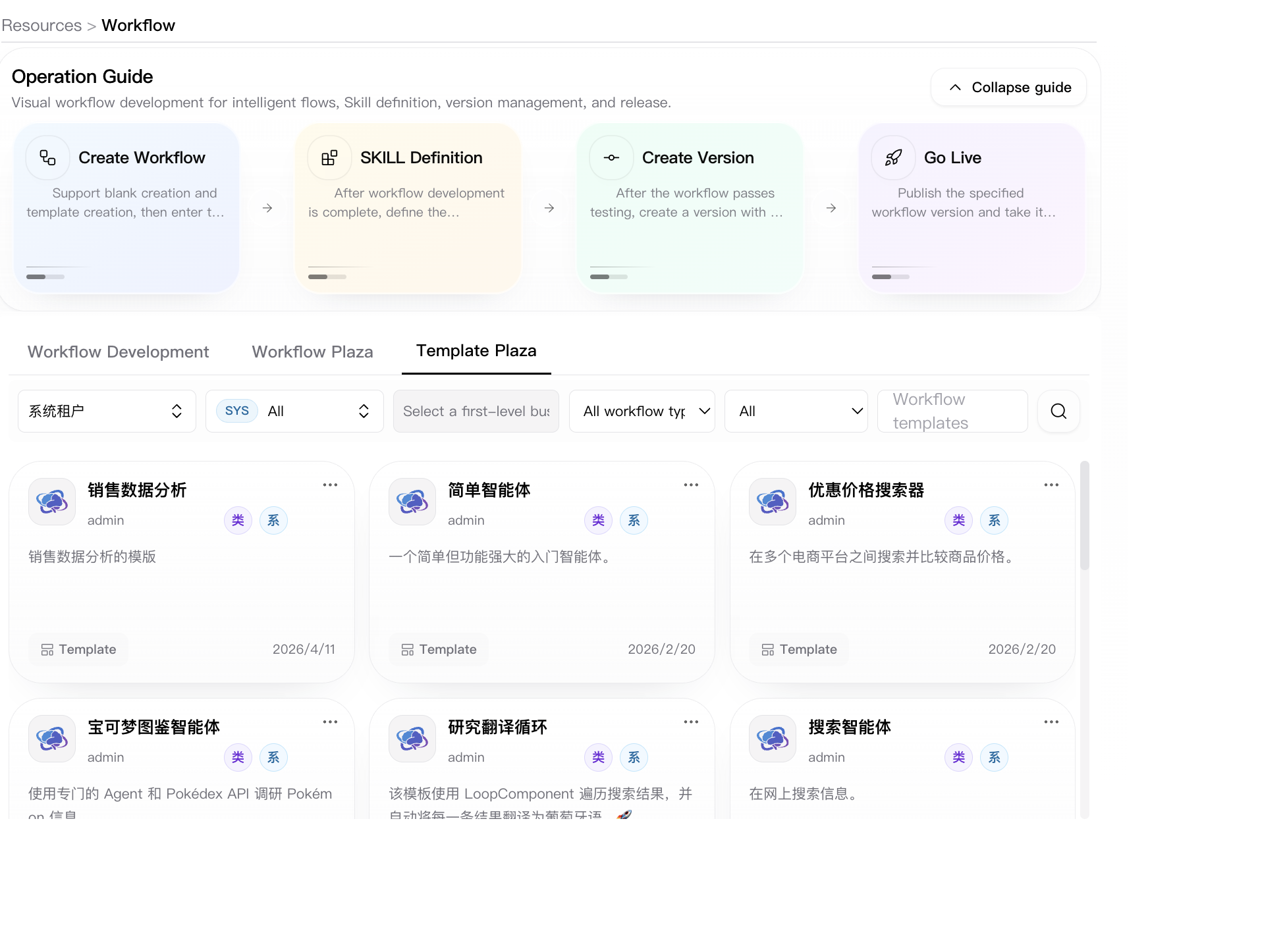
The template plaza is the browsing surface for reusable workflow templates. The page provides:
- tenant selector
- workflow-type selector
- access-type selector
- keyword search
- readable workflow-template cards
Users stay on this tab when they need to compare template candidates before creating a new workflow from a template.
Workflow template detail page
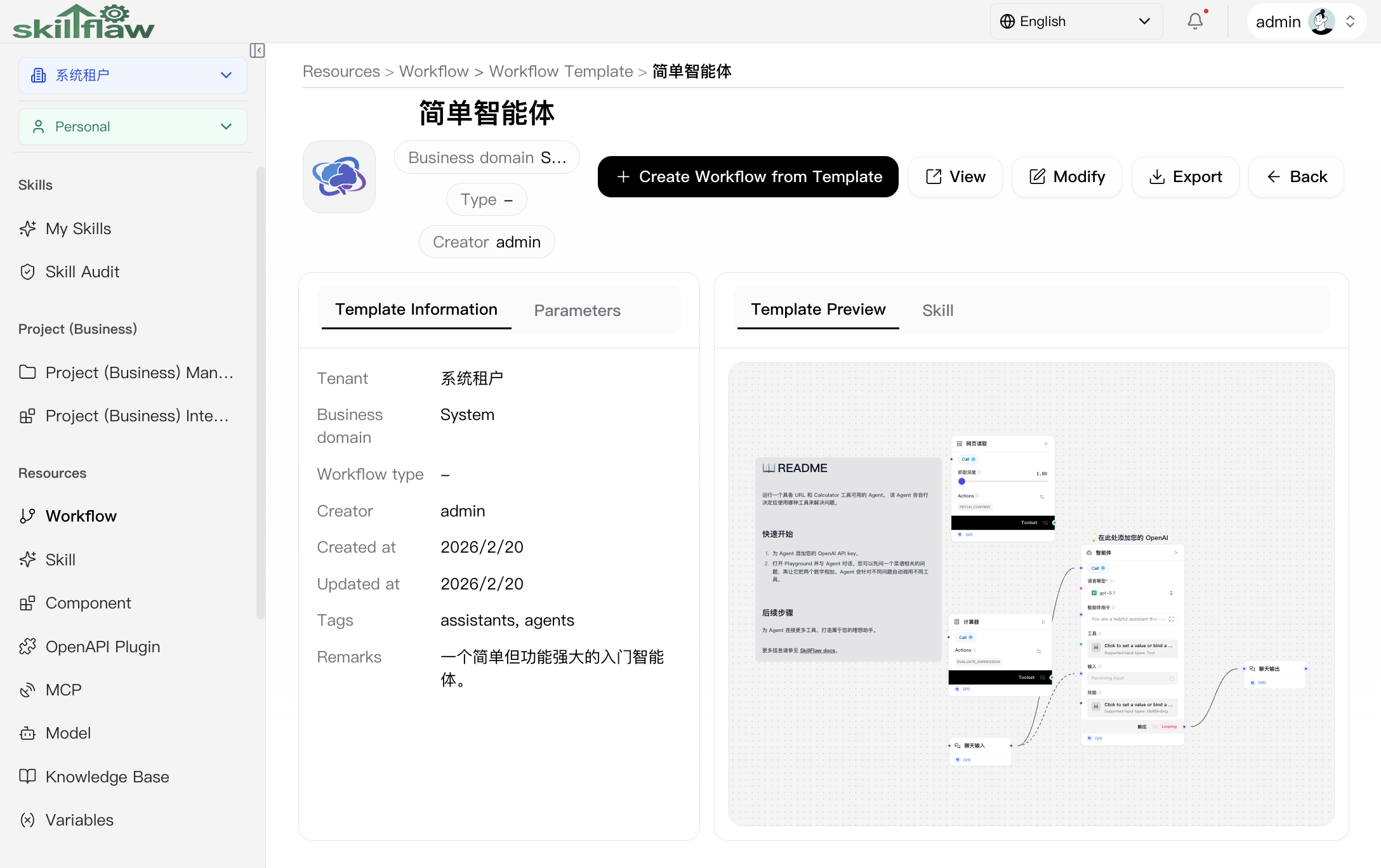
Open any template card from Template Plaza to enter the workflow template detail page. This page is the resource-level workspace for reviewing template metadata, checking exposed parameters, previewing the orchestration structure, and reusing the template as a new workflow.
The header area exposes these direct actions:
- Create Workflow from Template
- View
- Modify
- Export
- Back
The page also exposes four top-level tabs:
- Template Information
- Parameters
- Template Preview
- Skill
Template Information tab
The Template Information tab is the default summary view for the selected template. This tab shows the current metadata that users can directly review before reusing the template, including:
- Tenant
- Business domain
- Workflow type
- Creator
- Created at
- Updated at
- Tags
- Remarks
This tab is used to verify whether the template belongs to the expected scope and whether the template notes and tags match the intended use case.
Parameters tab
The Parameters tab is used to inspect the parameter definitions exposed by the template itself. Users review this tab when they need to understand what inputs or configurable arguments are required before creating a workflow from the template.
Template Preview tab
The Template Preview tab is the read-only visual preview of the workflow structure contained in the template. On this tab, users can:
- inspect the node graph before creating a workflow from it
- verify the main orchestration path and connected tools
- review visible component settings in the current preview state
Skill tab
The Skill tab is used to review the skill-facing description or related markdown content carried by the template. This tab is suitable for checking whether the template's usage guidance and exposed behavior match the business scenario being prepared.
Common operations
Browse reusable templates
- Open Resources > Workflow.
- Switch to Template Plaza.
- Filter by tenant, type, access type, or keyword.
- Open a template card to continue reviewing details.
Review template details
- Open a template from Template Plaza.
- Check Template Information for ownership, creator, tags, and remarks.
- Open Parameters if you need to inspect the exposed template inputs.
- Open Template Preview and Skill to review the orchestration and usage description.
Create a workflow from a template
- Open the target template detail page.
- Click Create Workflow from Template.
- Complete the required fields in the creation dialog.
- Confirm to generate a new workflow instance from the selected template.
Export a workflow template
Use Export on the template detail page when you need to extract the current template for downstream delivery or further processing.